REVIEW · KUALA LUMPUR
Malaysia eSIM (1 to 30 days. Up to 60GB of Data)
Book on Viator →Operated by Xplori · Bookable on Viator
It takes two minutes to get connected. This Malaysia eSIM plan is built for one job: keep your phone online after you land in Kuala Lumpur, without hunting for a SIM shop. I like the email delivery + QR activation setup, and I also like that you get 4G/5G data at local rates for your chosen trip length.
There is one catch to think about up front: it only works if your device supports eSIM, and activation requires internet access. So if your phone can’t use eSIM, this is a no-go.
In This Review
- Key highlights at a glance
- What You’re Actually Buying: a Malaysia eSIM, Not a “Tour”
- Price and Value: $7.90 for Coverage That Follows You
- Before You Leave: Check eSIM Compatibility and Get Your QR Code Ready
- Activation Day in Plain English: Email, QR, Install, Enable Roaming
- Using It Around Kuala Lumpur (and Beyond): 4G/5G Speed That Fits Real Travel
- The Data Cap: Up to 60GB High-Speed, Then 3G
- Support When Things Get Weird: Remote Help From Xplori
- No Physical Logistics: Why “Digital Only” Can Still Be a Plus
- Who This eSIM Fits Best (and Who Should Think Twice)
- Practical Tips to Make It Go Smoothly
- Should You Book This Kuala Lumpur Malaysia eSIM?
- FAQ
- What is included with this Malaysia eSIM?
- How do I activate the eSIM?
- Do I need to meet someone in Kuala Lumpur?
- Will this work on any phone?
- How much data do I get?
- What happens after I use the high-speed data?
- Can I cancel if my plans change?
Key highlights at a glance
- Email delivery with QR code means you can prepare before you’re even in Malaysia
- 4G/5G with local rates keeps maps, translation, and messaging practical
- Up to 60GB high-speed data, then speed drops to 3G
- Activation in minutes with the right setup on departure day
- Remote customer service if something doesn’t click during activation
What You’re Actually Buying: a Malaysia eSIM, Not a “Tour”
This isn’t a guided outing with a start time and a group meeting. What you’re buying is a digital eSIM data plan for Malaysia, from a provider called Xplori. You receive everything by email, install it on your phone using the QR code, and then use mobile data for the number of days you selected (from 1 to 30 days).
Why that matters: in a place like Kuala Lumpur, you’ll use your phone nonstop—maps, Grab rides, food searches, booking tickets, and quick translation. A physical SIM can be fast too, but it adds friction. With eSIM, you remove the “find a shop, wait, fill out forms, hope it works” step.
Also, the “start” and “end” points shown for this experience mention Kuala Lumpur and the PETRONAS area. Don’t worry: there is no pickup and no meetup. The plan is tied to Malaysia usage, and you can use it anywhere across the country once activated.
You can also read our reviews of more tours and experiences in Kuala Lumpur.



Price and Value: $7.90 for Coverage That Follows You
The price shown is $7.90 per person and the data allowance is up to 60GB (with speed changes after the cap). If you’re a light user, the cost can feel almost too good. If you’re a heavy user—streaming video, uploading photos, frequent navigation—the value depends on whether you’ll hit the data cap.
Here’s the practical way I think about it:
- If you mainly need messaging, maps, and browsing, you’ll likely stretch the high-speed portion longer than you expect.
- If you’re doing a lot of video calls, streaming, or hotspot-style use (not specifically described, so just be cautious), you should plan to ration data once you approach the cap.
After the high-speed data usage is used up, the plan switches to 3G. That’s not “no internet,” but it can change how enjoyable certain things are—video loading and fast uploads can get slower. If your trip includes long days away from Wi‑Fi, consider it your signal to use Wi‑Fi when you find it.
Bottom line: for the price point, this is aimed at people who want predictable mobile access without the physical SIM hassle.
Before You Leave: Check eSIM Compatibility and Get Your QR Code Ready
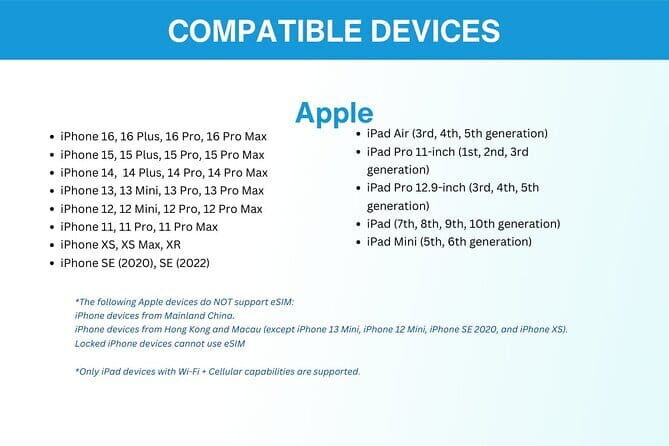
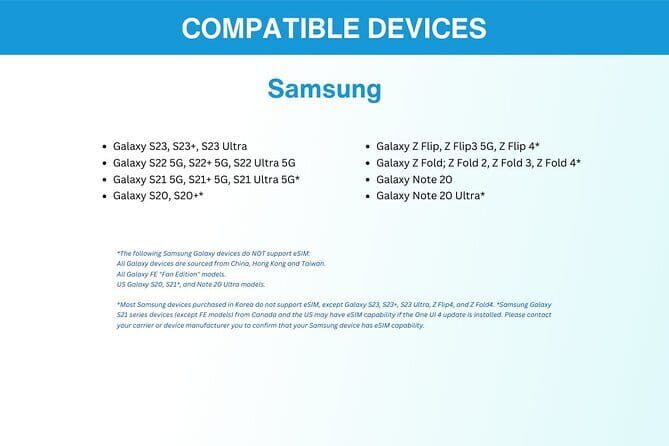
The biggest “do this now” step is verifying that your phone supports eSIM. The plan explicitly asks you to double-check compatibility and ask if you’re unsure. That matters because eSIM support varies by phone model and region.
Then there’s timing. You’re advised to set up your eSIM on the same day as your departure date. The reason is simple: activation needs you to enable the plan when you’re ready to use it. Waiting until arrival can work too, but the product guidance is clear that you’ll have the best flow when you follow that departure-day approach.
Also, the plan recommends printing the QR code and carrying it during your vacation as a backup. That’s not dramatic—QR codes can be easy to misplace if you rely only on your email app, a phone battery, or a cloud sync you didn’t expect. A paper backup is low effort and high reassurance.
One more practical note: you’ll need internet access to activate the eSIM. So don’t plan to activate from pure cellular-hell. If you’re traveling from abroad, have a way to get Wi‑Fi (hotel, airport Wi‑Fi, or another connection) during setup.
Activation Day in Plain English: Email, QR, Install, Enable Roaming

The workflow is straightforward, and that’s a big reason people like this kind of product.
Here’s what you can expect:
- Order and receive an email with your eSIM details and a unique QR code
- On your departure day, activate the data plan by scanning that QR code
- Enable the needed data roaming setting when you reach Malaysia (the guidance specifically calls out enabling roaming upon reaching the destination)
The key is that it’s supposed to be quick. You’re not waiting for a store to open or a clerk to help you. Once the eSIM is installed and the plan is activated, you should be ready to use your data right away.
What can go wrong? Usually it comes down to one of these:
- your phone doesn’t actually support eSIM
- your activation is attempted without internet access
- the roaming setting isn’t enabled when you land
If you want fewer headaches, do a quick check of eSIM support before you travel, and make sure you have some Wi‑Fi available for activation.
Using It Around Kuala Lumpur (and Beyond): 4G/5G Speed That Fits Real Travel
In Kuala Lumpur, you’ll feel data speed fast. When you’re checking transit options, using ride-hailing, or searching for food near you, slow data is just annoying. The plan advertises 4G/5G data at local rates, and the practical promise is that it’s built for normal day-to-day travel usage, not just emergency messaging.
In real-world terms, this is what “good connectivity” looks like:
- maps stay responsive
- calls and video are stable enough when you need them
- uploads for photos and sharing work without constant retries
The reviews tied to this product emphasize that the internet speed is fast and reliable, and one review specifically notes solid performance even in rural areas. Another highlights the ability to stream and video call without interruptions. I can’t guarantee coverage in every corner of Malaysia from the info alone, but the pattern is consistent: the service aims for stable throughput, not just a token connection.
Also, you’re not locked into one carrier the way you are with a physical SIM. One reviewer called out the ability to switch carriers without the hassle of physical cards, which is exactly what eSIM is good at for frequent travelers.




The Data Cap: Up to 60GB High-Speed, Then 3G

Let’s talk about the part that determines your experience the most: the data cap.
You get up to 60GB at high speed (the plan describes high-speed data usage is capped at the mentioned amount). After that cap, the speed drops to 3G.
So how should you manage that?
- If you’re a map + messaging + occasional photo traveler, you might not notice the cap until later in the trip.
- If you rely heavily on streaming or nonstop uploads, you’ll feel the difference once you hit the limit.
A smart trick: check your data usage inside your phone settings regularly. Don’t wait until the final day to discover you’re on 3G. That one surprise can turn what should be a smooth trip into a slow-burn frustration.
Support When Things Get Weird: Remote Help From Xplori

The plan includes remote customer service. That’s important because eSIM setup can be easy… until it isn’t. When the problem is technical—QR not scanning, roaming toggles, activation errors—remote help can save you time.
From the feedback, customer support came up as a highlight. One review notes that small problems were solved quickly and professionally. Even if your setup is smooth, it’s reassuring to know help is part of the package.
No Physical Logistics: Why “Digital Only” Can Still Be a Plus
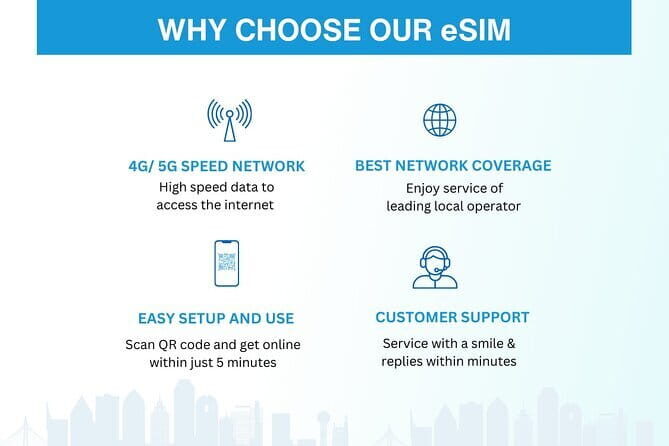
This is a purely digital product. There’s no pickup, no meetup, no waiting outside a shop. For many people, that’s the best part.
You’ll still see location references (like the PETRONAS Twin Towers area), but practically, none of that affects your day. Your “meeting point” is your phone.
If you hate wasting travel time on errands, you’ll probably appreciate this format. It also reduces the risk of missing a connection because you had to go “do one more thing” to get data.
Who This eSIM Fits Best (and Who Should Think Twice)
This plan is a good match if you want:
- quick setup using a QR code
- mobile data in Malaysia for 1 to 30 days
- 4G/5G with a clear cap (up to 60GB)
- the ability to avoid buying and swapping physical SIM cards
You might think twice if:
- your phone doesn’t support eSIM
- you don’t have reliable Wi‑Fi available for activation
- you’re likely to burn through data fast and can’t tolerate the speed drop to 3G after the cap
Also, if you’re the type who always finds free Wi‑Fi, you may not need a large data allowance. But if you’d rather not hunt for Wi‑Fi while you’re moving around, this makes sense.
Practical Tips to Make It Go Smoothly
Here are the small habits that reduce stress:
- Confirm eSIM compatibility before you leave. It saves time and avoids last-minute detours.
- Have Wi‑Fi ready for activation. Activation needs internet access.
- Set up on departure day as suggested, then enable roaming when you land.
- Print or save your QR code as a backup.
- Track your data usage so you know when you’re approaching the high-speed limit.
These are boring tips. That’s why they work.
Should You Book This Kuala Lumpur Malaysia eSIM?
If you want an easy, predictable way to stay connected in Malaysia—starting with your arrival in Kuala Lumpur—this is a solid pick. The combination of email delivery, quick QR activation, and 4G/5G at local rates is exactly what helps you avoid travel friction. The reviews also point to fast and reliable performance, plus helpful remote support when activation gets stuck.
I’d especially recommend it if you:
- travel for a week or two and want a simple setup
- use your phone heavily for navigation and communication
- dislike physical SIM errands
Skip it if you’re not sure your phone supports eSIM or you can’t handle the activation steps (Wi‑Fi + QR + roaming settings). In those cases, you’d be paying for frustration.
FAQ
What is included with this Malaysia eSIM?
You get the eSIM delivered to you by email, plus remote customer service and mobile data access for the duration you select.
How do I activate the eSIM?
You activate it by scanning the unique QR code provided in the email. Activation requires internet access.
Do I need to meet someone in Kuala Lumpur?
No. This is a digital product with no pickup or meetup. You manage setup on your phone.
Will this work on any phone?
Not necessarily. You should double-check that your device supports eSIM technology before ordering.
How much data do I get?
The plan provides up to 60GB of data at high speed, based on the information given for the product.
What happens after I use the high-speed data?
After the high-speed data cap is reached, your speed switches to 3G.
Can I cancel if my plans change?
Yes. Free cancellation is available up to 24 hours before the experience’s start time for a full refund.